

The lowest-looking hotel rate isn’t always the best deal. To compare hotel prices, check online travel agencies, hotel booking websites, and comparison platforms, then weigh the full stay details, not just the headline rate. Each may show different offers and booking terms.
A quick search is a useful starting point, but prices are hard to judge when room types, cancellation rules, taxes, and included extras differ. A cheaper rate may offer less flexibility, while a hotel’s direct booking option may have different terms or benefits.
This guide explains how booking sites differ and how to compare like-for-like options. Learn which filters can narrow your search, what to check before choosing a rate, and how to identify better value. You can also explore stays and flights through Dwano Travel.
Key Takeaways
- Learn how booking platforms and hotel websites differ, so you can choose the route that fits your trip.
- Use filters to narrow options by the features and booking terms that matter most to you.
- Compare the full stay details before deciding which offer delivers better value.
- Find practical ways to search for lower rates without overlooking important trade-offs.
- See what to look for in comparison tools and how Dwano Travel can help you explore stays.
Comparing online travel agencies with direct hotel booking sites
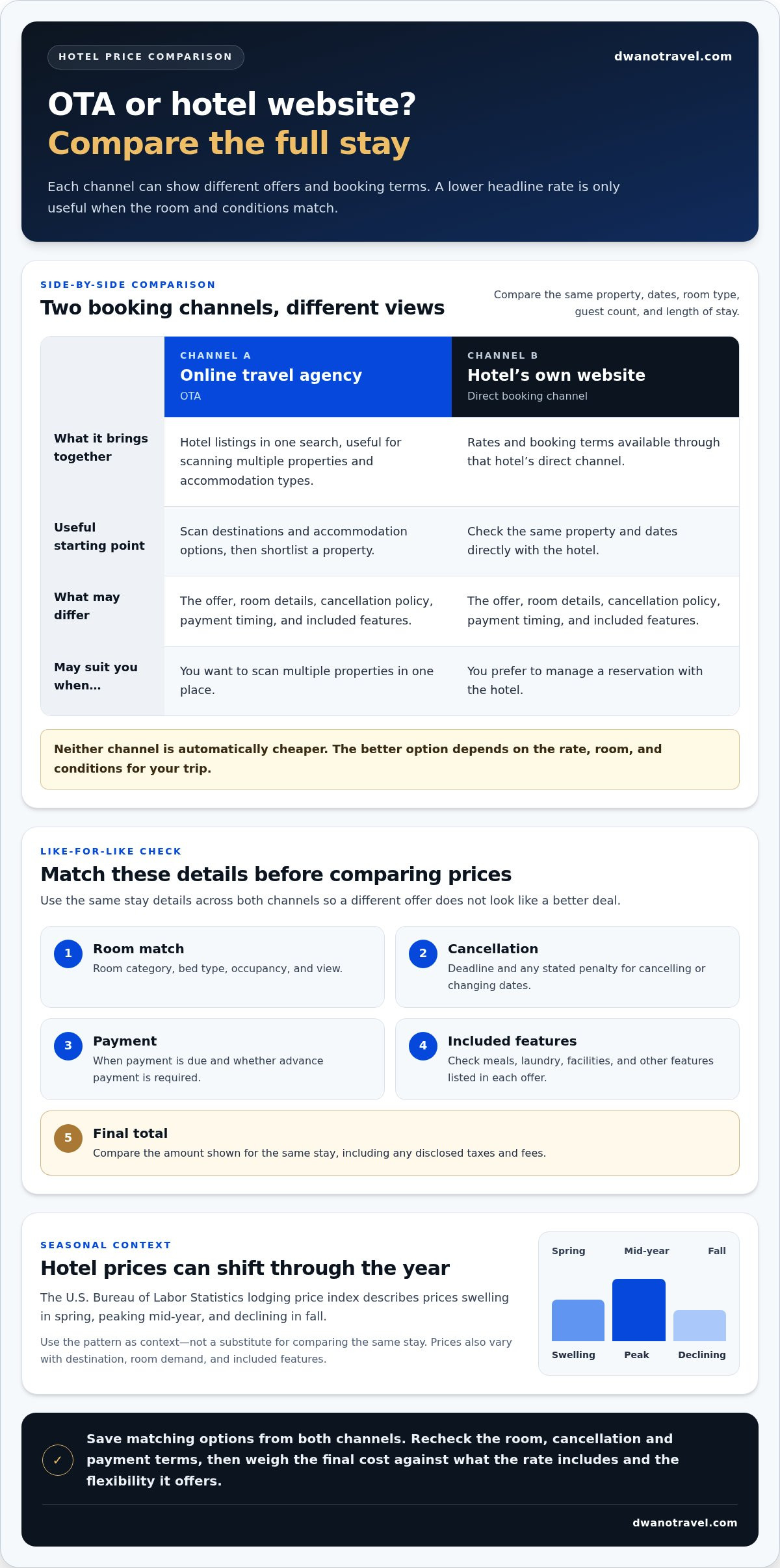
Online travel agencies, or OTAs, bring hotel listings together in one search. A hotel’s own website displays the rates and booking terms available through its direct channel. Compare both for the same dates, room type, guest count, and length of stay. Otherwise, a lower headline rate may reflect a different room or cancellation policy.
Start with an OTA to scan destinations and accommodation types. Then open the hotel’s direct website for the same property and dates. For a Hilton stay, compare the exact room category and bed setup on both sites. Check breakfast, payment timing, cancellation terms, and other included features. The U.S. Bureau of Labor Statistics notes that some lodging establishments include meals, laundry services, or recreational facilities, while others provide lodging only. So included features are part of the comparison, not just an extra detail.
Next, compare the complete booking terms side by side:
- Room match: Confirm the room category, bed type, occupancy, and view match.
- Cancellation: Compare the deadline and any stated penalty for cancelling or changing dates.
- Payment: Note when payment is due and whether the displayed rate requires advance payment.
- Included extras: Check meals, laundry, or facilities described in each offer.
- Total cost: Compare the final amount shown for the same stay, including any disclosed taxes and fees.
Don’t assume a hotel’s website is automatically cheaper, or that an OTA always has the lowest rate. Each channel can show different offers and terms. Booking direct may suit someone who prefers to manage a reservation with the hotel. An OTA is useful for scanning multiple properties in one place. The better option depends on the rate, room, and conditions for your trip.
Dates matter, too. The U.S. Bureau of Labor Statistics lodging price index shows prices swelling in spring, peaking mid-year, and declining in fall. Use this seasonal pattern as context, then compare options for your dates. Prices also vary with destination, room demand, and included features, so compare the same stay rather than relying on a general trend.
To compare hotel prices fairly, save matching options from both channels before booking. Review the cancellation and payment terms again, then choose the offer that best balances cost, room details, and flexibility. A careful check can show whether a small rate difference comes with a meaningful change in what you receive.
A destination-level search can help you find options before comparing individual properties and their terms.
Treat these starting points as a place to begin, not a like-for-like verdict. Check the specific hotel, room category, dates, and conditions before deciding which option is cheaper. When comparing a destination across an OTA and a hotel site, keep the stay details consistent and consider the final total alongside what the rate includes. A deal label alone cannot tell you whether cancellation flexibility, payment timing, or included features match your priorities.
Hotel search filters and sorting options
Before choosing the cheapest hotel, match the room type, amenities, location, and policies to your trip. Check whether the room suits your group, whether useful features are included, how far it is from your plans, and what the cancellation and payment terms allow.
Start with the search details that shape every result: destination, check-in and check-out dates, and guest count. For a family staying near a city center, use the same dates and guest count across sites. Changing these details can affect which rooms appear and how offers compare.
Then use filters to remove options that don’t meet your practical needs. Choose filters based on how you’ll use the room, not on a long list of appealing features. For example, a remote worker might prioritize Wi-Fi and a desk, while someone arriving late may care more about reception hours. A pool or restaurant adds value only if you plan to use it.
- Room setup: Compare bed configuration, occupancy, room size, and any stated view. A twin room and a room with one larger bed may not suit the same travelers.
- Amenities: Select useful features such as breakfast, parking, air conditioning, or Wi-Fi. Read the room details to see whether each feature applies to your selected room.
- Location: Use a map or neighborhood filter to judge distance from the places you’ll visit. A lower rate outside the center may mean a longer journey to a museum, office, or transit stop.
- Policies: Filter for preferences such as free cancellation or a particular payment arrangement. Review the terms attached to the specific rate before booking.
Sorting changes the order of results, not which property is best. “Lowest price” can surface a room with fewer inclusions or stricter terms. “Guest rating” may help identify well-reviewed options, but consider reviews alongside location and room details. Sorting by distance can help when your trip centers on a venue, while sorting by rating can make sense when service matters most.
Use filters in stages. First set your destination, dates, and guest count. Next, apply essential requirements, such as a suitable bed setup or accessible facilities. Then sort by price or distance and inspect a shortlist of matching properties. If results are too limited, remove a nonessential preference, such as a pool, rather than changing your travel dates or accepting an unsuitable room.
Before selecting an option, open its full listing and check that the room matches your filters. Confirm the amenities, location, and booking terms for that specific room. This final step prevents a search-page summary from making different room offers look equivalent.
Ways to find cheaper hotel deals
To find a better rate, compare the same hotel, room, and dates across booking channels. Change one factor at a time, such as arrival day or stay length, to see how it affects the total. A lower nightly rate may not mean a lower overall cost if it comes with stricter terms or excludes useful features.
The best time to book depends on destination demand, travel dates, and the rates available for your chosen room. The U.S. Bureau of Labor Statistics lodging price index shows prices swelling in spring, peaking mid-year, and declining in fall. Treat that as seasonal context, then compare options for your dates and book when the rate and terms suit your plans.
Yes, hotel prices can change with booking date, length of stay, and day of the week. Availability and demand affect the rooms and rates offered, while a longer stay may be priced differently from separate short stays. Compare the total for your full itinerary, then test nearby arrival or departure dates if your plans allow.
Try these practical steps to find more suitable offers:
- Compare nearby dates: Search a weekday arrival and a weekend arrival for the same destination and room.
- Test stay length: Compare the full trip total for consecutive nights against a slightly adjusted itinerary.
- Consider another area: A hotel farther from a popular venue may cost less, but include the time and transport needed to reach your plans.
- Review the rate terms: Compare payment timing and cancellation conditions before choosing the lowest displayed amount.
Member rates, coupons, and credit card offers can reduce the amount an eligible traveler pays. Their value depends on eligibility, booking channel, travel dates, and any restrictions. A coupon may apply only to selected rooms, while a card offer may require a particular payment method. Compare the final price after applying an offer, not just its advertised saving.
Check an offer’s conditions before changing your booking choice. Confirm which room and dates qualify, whether the discount applies to the full stay, and whether it changes the cancellation or payment terms. If a member rate appears after signing in, compare it with the public rate for the same room. A lower price is useful only if the conditions suit your trip.
Keep a simple record of your searches: note the property, room, dates, total, and booking terms. Then compare hotel prices again after changing one variable, such as the length of stay. This makes it easier to spot a genuine saving rather than a difference caused by a different room or policy.
Hotel price comparison
Compare the same destination, dates, room type, and guest count to make each result meaningful. Then review the full stay total and terms, not just the first rate displayed.
Booking Site Comparison Tools
Hotel booking sites may offer side-by-side rates, map views, or price sorting. Use these tools to shortlist matching rooms, then open each listing’s details. Refundable rates allow cancellation under the stated policy and may cost more; nonrefundable rates usually offer less flexibility in exchange for a lower displayed rate. Compare the cancellation deadline and payment terms before choosing.
Fees and Taxes
Include every tax and fee shown in the booking summary, such as property charges, service fees, or local taxes. Names and payment timing can vary by destination and booking channel. Check whether the displayed total includes each charge or whether an amount is due at the property. Compare the final amount for the full stay, not just the nightly figure.
For example, compare two offers for the same room at Cambria Hotel Nashville Airport. Confirm that both have identical dates, occupancy, and cancellation terms before comparing rates. If one offer includes breakfast and the other does not, they are different packages. The U.S. Bureau of Labor Statistics notes that some lodging establishments include meals or recreational facilities, while others provide lodging only.
A clear comparison record helps. Note the booking site, room name, total stay cost, included features, payment timing, and cancellation policy for each option. Review these details together. A lower total may suit a fixed itinerary, while a flexible rate may matter more if plans could change.
- Match the room: Check bed setup, occupancy, and room category.
- Compare the stay total: Include all taxes and disclosed fees.
- Review cancellation: Note whether cancellation is allowed and its deadline.
- Check inclusions: Compare meals and facilities that affect your plans.
Use the booking summary as your final comparison point. A search result may show a starting rate, while the detailed checkout view displays charges and terms for the selected room. Read that summary before booking, and make sure the property, dates, and guest count still match your search.
A stay’s total depends on the destination, dates, occupancy, room, and selected terms. The exact figure appears in a quote for that specific booking.
These starting rates can help identify options, but they don’t show which stay costs less for your trip. Compare the figures only after checking the selected dates, room details, and charges.
A starting rate is not necessarily the payable total, and room types or terms can change what is included. Treat these examples as prompts to inspect each offer’s full stay quote, then decide based on the matching room and booking conditions, not the lowest visible nightly figure.
Which hotel booking sites offer the best price comparison tools?
The most useful booking site is one that helps you compare matching rooms and understand each total. Start with a booking platform for a broad search, then compare its offers with the hotel’s own website. Judge the options by how clearly they show room details, booking terms, and the full stay cost.
A good search page makes it easy to keep your destination, dates, and guest count consistent. Map views can help compare neighborhoods, while filters narrow results to the room features or policies you need. Sorting by price helps build a shortlist, but it can’t tell you whether two rooms have the same bed setup or cancellation terms.
Look for these comparison features as you search:
- Clear rate details: Check whether the result shows the room category, included features, and payment conditions.
- Useful filters: Narrow the list by location, amenities, room type, or cancellation preferences that matter for your trip.
- Map and list views: Compare a hotel’s position with nearby options, then return to the list to review rates.
- Transparent totals: Open the booking details and review the final stay amount alongside any disclosed taxes or fees.
- Comparable results: Keep dates, occupancy, and room requirements consistent across searches.
For example, if you’re choosing between hotels near a convention center, use a map to assess distance first. Then sort nearby options by price and open the room details. A low result may refer to a different room type, so compare the exact bed setup and included features before treating it as the best deal.
Hotel websites are useful for checking a property’s direct booking option. A booking platform helps you scan several properties together, while a hotel site focuses on that hotel’s available rooms and terms. Neither view alone guarantees the best fit. Use both to compare fairly, then review the cancellation policy and payment timing for your preferred offer.
Choose tools that make these details easy to see, rather than relying on the first price in a result list. Clear rate information matters: pricing transparency accounted for 15% of Forbes Advisor’s hotel booking site evaluation score. Use that principle in your own search by checking what each displayed amount includes.
For your next search, explore hotel stay options and compare the details that shape your booking decision.
Dwano Travel: Stays
Dwano Travel brings live prices from 500,000+ hotels together, helping you explore stays after comparing room details and booking terms. Use it when you’re ready to narrow your search and choose accommodation for your trip. Most stays offer free cancellation, and bookings include secure payment and instant confirmation. Pay Later is also available.
Review the room, dates, and cancellation terms that matter to you before booking. If your trip includes air travel, you can also explore flights alongside your stay planning.
Visit Dwano Travel to explore stays for your trip.
Make your next booking decision with confidence
Start your next trip with a clear choice: decide what matters most for your stay, then choose an option that fits your plans. A flexible booking may suit an itinerary that could change, while a fixed schedule may make a different rate more appealing. Keep your priorities in view as you compare hotel prices, and let the right fit guide your decision.
Dwano Travel offers Stays and Flights, bringing both parts of travel planning into reach. If you’d like help exploring your options, contact Dwano Travel for help. Take the next step at your own pace, and get ready to enjoy the journey ahead.
Frequently Asked Questions
What Are the Different Types of Hotel Bookings Sites?
Hotel booking sites generally include online travel agencies, comparison or metasearch sites, and hotel websites. An online travel agency lets you search and reserve rooms through its platform. A comparison site gathers rates to help you browse options, then may direct you to a booking provider. A hotel website handles reservations directly with that property. For example, use a comparison site to discover options, then review the hotel’s own booking page.
How do hotel prices compare across booking sites for the same dates and room?
Rates for matching dates and rooms can differ because sites may display different offers, booking conditions, or available inventory. For a fair comparison, match the property, room name, occupancy, and rate terms. For example, a refundable offer and an advance-payment offer are different products, even if both show the same room. Compare the final stay totals and included conditions before choosing the option that suits your plans.
What is the total cost difference between booking directly with a hotel and using a third-party site?
There’s no single cost difference that applies to every hotel or booking. Compare the final totals for the same room, dates, guests, and cancellation terms. Include all disclosed taxes, fees, and eligible discounts in each total. A third-party offer may look lower before checkout, while a direct rate may have different conditions. The meaningful difference is the amount payable for equivalent booking terms.

