

The lowest-looking hotel result isn’t always the easiest way to arrange your trip. To book hotels online and flights together, use a booking service that offers both. Metasearch tools can help compare hotel options, but may send you elsewhere to book. The right option depends on whether you value booking both parts of your trip on one platform, flexible cancellation, or comparing dates and rates.
It makes sense to want a simple way to compare stays without losing sight of the rest of your travel plans. Before you reserve, check the room’s cancellation terms, payment timing, and total cost, including any extra fees. These details can matter as much as the displayed rate.
This guide explains how online travel agencies and metasearch tools differ, what to review before booking, and how to find a stay that leaves room for plans to change. You’ll also learn how to compare dates, understand payment terms, and keep your reservation details handy.
Key Takeaways
- Compare prepaid, refundable, and pay-at-the-hotel rates by weighing the savings against the flexibility you need.
- For a last-minute stay, review the cancellation terms and reconfirm important requests 24-72 hours before arrival.
- Know the difference between travel agencies that handle bookings and metasearch tools that compare options, so you can choose the right path to reserve.
- Search with the correct destination, dates, and guest count, then compare nearby dates if your plans allow.
- Compare the full hotel total, including taxes and possible charges for resort amenities, parking, or extra guests.
Hotel and accommodation deals
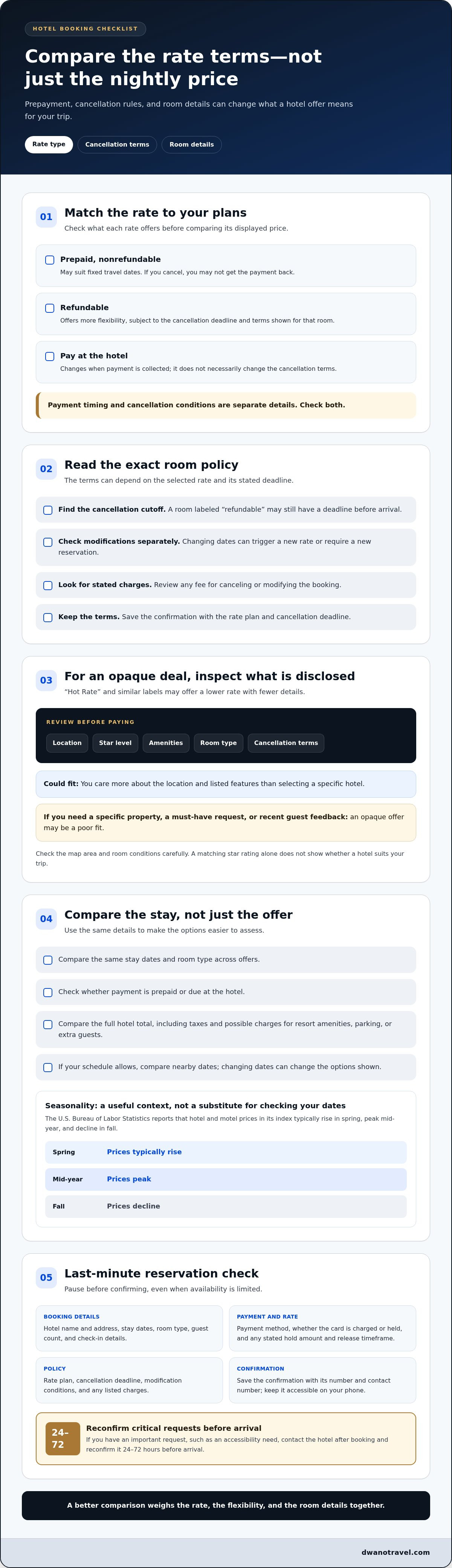
Hotel deals differ in more than their displayed nightly rate. A prepaid, nonrefundable rate may suit fixed travel dates, while a refundable rate offers more flexibility. A pay-at-the-hotel option changes when payment is collected, not necessarily the cancellation terms. Compare the rate conditions with the room details before choosing.
What are the cancellation and modification rules for online hotel bookings? They depend on the selected rate and its stated deadline. Refundable bookings can usually be canceled within the listed window, while nonrefundable bookings may not return the payment. Changing dates can also trigger a new rate or require a new reservation.
Read the cancellation policy for the exact room offer, not just the hotel’s general policy. Check the cancellation deadline, whether changes are allowed, and any stated charge for canceling or modifying. For example, a room labeled “refundable” may still have a cutoff before arrival. Save the booking confirmation with the rate plan and deadline.
“Hot Rate” and similar labels often indicate deals that emphasize a lower rate while providing fewer details. Before paying, read the listed location, star level, amenities, room type, and cancellation terms. If the hotel’s name is hidden until after booking, treat the offer as opaque: you’re choosing based on its disclosed attributes rather than a named property.
Opaque deals can work when location and listed features matter more than choosing a specific hotel. They’re a poor fit if you need a particular property, have a must-have request, or want to check recent guest feedback before committing. Review the map area and room conditions carefully. A matching star rating alone doesn’t show whether the hotel suits your trip.
Seasonality can shape the options available. The U.S. Bureau of Labor Statistics reports that hotel and motel prices in its index typically rise in spring, peak mid-year, and decline in fall. Use that pattern as context, then compare your exact dates and rate terms. A lower displayed rate may not be a better deal if it removes cancellation flexibility or leaves important room details unclear.
- Compare the same stay dates and room type across offers.
- Check whether payment is prepaid or due at the hotel.
- Review cancellation deadlines and modification conditions before checkout.
- For an opaque offer, assess the disclosed location and amenities before booking.
Before you book hotels online, weigh the offer’s overall value, not just its headline rate. A flexible option can make sense when plans may shift; a nonrefundable deal may suit firm dates. Keep the confirmation and policy together so you can find the terms you selected if plans change.
Last-minute hotel reservations
A late hotel search can still be organized: compare available rooms, dates, and rate terms before paying. For a short-notice stay, prioritize the location and arrival details you need most.
Refundable and Nonrefundable Reservations
A refundable reservation allows cancellation within the deadline shown in its terms. With a nonrefundable reservation, you may lose the payment if you cancel. Modification rules can differ from cancellation rules, so read both before choosing. If plans may change, favor a refundable rate and note its cancellation cutoff. For firm plans, weigh a nonrefundable offer against the loss of flexibility.
Last-minute availability can make it tempting to choose the first open room. Pause to check whether the rate is prepaid, payable at the hotel, or subject to a card hold. Payment timing and cancellation conditions are separate details. Make sure the room’s terms suit your arrival plans, especially if your schedule depends on a delayed flight or late check-in.
Reservation Details to Check
Before confirming, review the hotel name and address, stay dates, room type, guest count, check-in details, and payment method. Check the rate plan, cancellation deadline, and any listed charges. Then save a screenshot or booking confirmation with the confirmation number and contact number. These details make it easier to find the reservation if your arrival time or plans change.
Payment details matter, too. Check whether your card will be charged immediately or used for a hold, along with the hold amount and expected release timeframe. If you have an important request, such as an accessibility need, contact the hotel after booking. Reconfirm critical requests 24-72 hours before arrival so the request is visible ahead of check-in.
What should you check before confirming? Match the hotel, dates, room, guest count, payment terms, and cancellation deadline to your trip. Save the confirmation and note how to reach the hotel.
When should you book for the best price? There’s no single best booking time for every destination and date. Compare available rates for your exact stay, and weigh flexibility against the terms attached to each offer. For a last-minute search, compare nearby dates if your schedule allows, since shifting your stay can change the options shown.
After booking, keep the confirmation accessible on your phone and record the cancellation deadline separately. If your plans change, review the reservation terms before contacting the hotel or changing dates. A date change may affect the rate or require a different reservation, so check the updated details before approving any change.
Online travel agencies and metasearch tools
Online travel agencies and metasearch tools help you find hotel options, but they work differently. An agency displays offers and takes you through booking; a metasearch tool gathers options for comparison and may send you elsewhere to reserve. First decide whether you want to book on one platform or compare listings before choosing where to pay.
Use a metasearch result as a starting point, not the final comparison. Open the offer details and compare the same hotel, room type, dates, and guest count on another website. A lower headline rate may reflect different cancellation terms, payment timing, or included amenities. Keep the search consistent to see whether the offers truly match.
Google Hotels is one example of a metasearch tool. Hotels don’t pay Google to appear in its results or influence their ranking. Still, a result’s position doesn’t tell you whether its room terms suit your plans. Open the listing, note the booking source, and review the rate conditions before leaving the comparison page.
An online travel agency can be useful when you want to arrange more than a hotel stay. Some platforms let travelers search for stays alongside flights, keeping trip details in one account or itinerary. Compare the hotel’s terms in the agency listing, then note who handles booking changes. The name on your confirmation can help you find the right support channel later.
Try this comparison sequence before you reserve:
- Search the same destination, dates, room, and guest count across more than one website.
- Compare the final rate details, including payment timing and cancellation terms.
- Check whether the booking completes with the hotel or the platform.
- Save the confirmation from the site that processes the reservation.
Changing dates can reveal different choices. Compare a stay with dates one or two days earlier or later, if your schedule allows. Then compare the full terms, not just the displayed rate. A travel platform may show several booking sources for one property, so match the room and conditions before treating two results as equivalent.
Choose the route that suits your trip. A metasearch tool can make broad comparisons easier; an agency may suit travelers arranging a hotel and flight together. Either way, keep the reservation confirmation, cancellation deadline, and booking contact in one place. This makes the details easier to find if you need to review your reservation.
One travel expert recommends booking directly through a hotel website or using a travel agent, citing risks of booking-site failures and overbooking. A respondent also recommends comparing hotel prices on more than one website rather than relying on a single site. Consider these routes as you decide where to reserve, and compare equivalent room and rate terms across the options.
If your schedule allows, check prices for dates 1-2 days earlier or later than your preferred dates. Review each option’s booking conditions alongside the price, and include the hotel’s own website in the comparison before settling on a route. That gives you a chance to weigh the direct booking recommendation against the alternatives, using the details that matter for this stay.
Searching for stays by destination, dates, and occupancy
To book hotels online, enter your destination, stay dates, and guest count. Compare matching options, choose a room, review its terms, enter traveler details, and submit the reservation. Keep your search details handy so you can adjust one at a time if the results don’t fit.
Start with a destination that reflects where you need to spend time. Searching “Chicago” can return stays across a broad area, while a neighborhood or nearby landmark can narrow the results. If your plans include a meeting, search near its address. For sightseeing, consider the places you expect to visit and how you’ll travel between them. A map view can help you see whether a property suits your plans.
Enter check-in and checkout dates carefully. A one-night error can change which rooms appear and the length of your reservation. If your schedule is flexible, compare dates one or two days earlier or later. A small shift may show different available stays. Keep the number of nights consistent so you’re not comparing a shorter stay with a longer one.
Occupancy matters, too. Enter every adult and child who will stay in the room, rather than searching for one guest and adjusting later. For example, a search for two adults and two children may show different room types than a search for two adults. Read the room description to see whether it suits your group. Select the correct number of rooms if your party needs separate spaces.
Use this sequence to keep the search accurate:
- Choose a destination or specific neighborhood.
- Set the correct arrival and departure dates.
- Enter the full guest count and number of rooms.
- Filter results for needs such as breakfast or accessibility.
- Open a matching room and compare its details with your search.
Filters can make a long results list easier to scan. Apply one preference at a time, such as a preferred area, room feature, or meal option. If the results become too narrow, remove the last filter and compare again. This helps distinguish a lack of suitable options from a search made too specific by stacked preferences.
Before submitting, compare the result with your original search. Confirm the property location, stay dates, occupancy, room type, and number of rooms. If you book hotels online for a group, share the final itinerary details with the other travelers. Matching everyone’s dates and guest information helps avoid booking the wrong room setup.
What fees and taxes are added to online hotel bookings in the United States?
The displayed room rate may not show the full amount due for a United States hotel stay. Taxes and extra charges can affect the total, including resort fees, parking, and charges for additional guests. Compare the full price for the same dates and occupancy before choosing a room.
Taxes depend on the property’s location and the booking details shown at checkout. A stay in one city may display different taxes from a similar stay elsewhere. Review the tax line for each option instead of assuming two listings use the same calculation. The final amount shown before payment is the useful figure for comparing those specific bookings.
Resort fees are additional charges that may appear separately from the room rate. They can apply even when you don’t plan to use the associated amenities. Check whether the listing includes a resort fee and whether it’s already reflected in the displayed total. A lower initial rate may look different once that charge appears.
Parking is another cost to consider if you’ll bring a vehicle. Compare the hotel’s parking information with your travel plans, since the room rate alone won’t show the cost of parking. Extra-person charges can also affect stays with more guests than the room’s base occupancy. Enter the correct guest count during your search, then review the total again at checkout.
Use this quick comparison process for each hotel option:
- Set matching dates, room types, and guest counts.
- Open the final price breakdown before submitting payment.
- Identify taxes, resort fees, parking, and extra-person charges.
- Compare the complete totals, not just the first rate shown.
- Save the price details with your booking confirmation.
For example, if one listing has a lower room rate but adds a resort fee, compare its total with a listing that has a higher room rate and no separately displayed resort fee. Include parking in the comparison if you’ll drive. This keeps your decision grounded in the costs relevant to your trip, rather than a headline figure.
Before completing an online booking, scan the checkout page for taxes or charges added after you selected the room. Confirm that the guest count and dates still match your plans. If the total changes, review the itemized breakdown and compare it with another option using the same search details. This final step helps you understand what the reservation includes and what you’ll pay separately.
For a fair comparison, focus on the complete stay total and the charges that apply to your plans. If you’re arriving by car, include parking; if you’re traveling in a group, check extra-person costs. Reviewing taxes and fees together gives you a clearer basis for choosing between United States hotel offers.
Dwano Travel: Stays
Dwano Travel is a natural next step when you’re ready to compare stays and choose a hotel for your trip. Search live prices from 500,000+ hotels, then review the room details and booking terms that matter to you. Most stays offer free cancellation, and the platform also provides secure payment, instant confirmation, and a Pay Later option.
If you’re arranging your journey too, you can book flights alongside your stay. For help with a reservation, Dwano Travel offers 24/7 WhatsApp support. Keep your destination, travel dates, and guest details ready to make your search more focused.
Explore your stay options at Dwano Travel.
Make Your Next Trip Feel Like Yours
Your stay is more than a place to sleep. It shapes how easily you can reach the moments that matter, from a relaxed morning to a full day exploring somewhere new. Think about your travel plans before you reserve, and choose the option that supports the kind of trip you want.
As you book hotels online, focus on what will make your time away work for you. A convenient base, the right room setup, and terms that suit your plans can make a booking feel considered rather than rushed. Keep your priorities in view and let them guide your decision.
Then bring the rest of your journey together at a pace that feels comfortable. You don’t need every detail figured out at once. Start with the stay, then decide what else belongs in your plans.
Ready to take that next step? Explore your travel options with Dwano Travel and start shaping a trip that feels right for you.
Frequently Asked Questions
Which platforms let you book a hotel alongside other travel services?
Choose an online travel agency that offers both hotel stays and flights, such as Dwano Travel. Search for both parts of your trip on one platform to keep planning in one place. For example, enter your destination and travel dates, then look for a stay and a flight that fit your itinerary. Keep each reservation’s confirmation details accessible as you prepare to travel.
What are the best websites and apps to book hotels online in the US?
The best choice depends on whether you want hotel options alone or hotel and flight searches together. Dwano Travel offers both stays and flights, making it an option for travelers planning those parts of a trip. On any website or app, consider how easily you can review your reservation details later. Choose a booking platform that suits your trip-planning preferences and the services you want to arrange.
How can I find the cheapest hotel rates and discounts online?
Look for savings that match your travel habits, rather than focusing only on a discount label. If you regularly stay with one hotel brand, compare its member rates and loyalty benefits with other available offers. Read the promotion’s conditions, including eligible dates and room types, before relying on a discount. Then compare the final amount and booking terms, since a promotion may not suit every stay.

